BIRTHDAY
Birthday Car AI Video Generator: Make Yours in Minutes
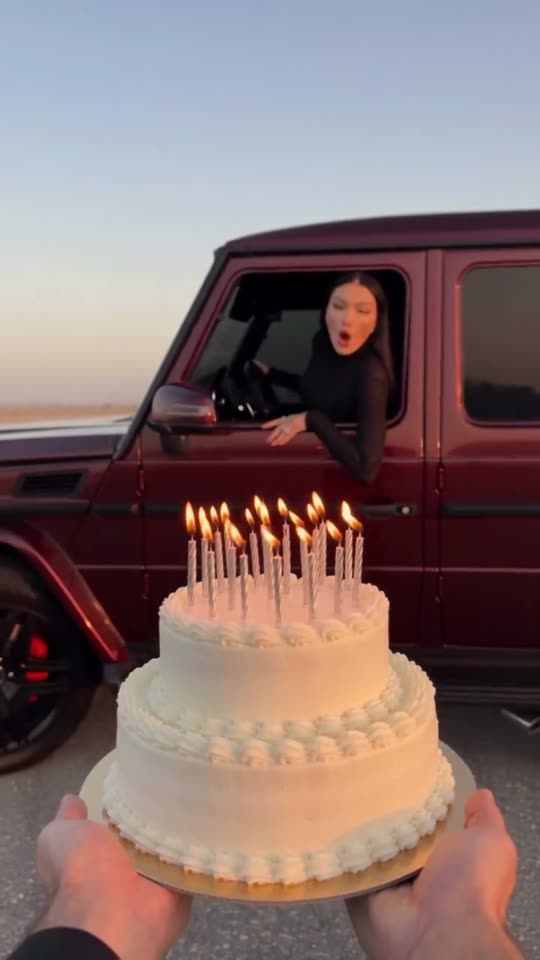
A car drifts into view, its driver leans toward the cake, blows out the candles, and the moment freezes in black and white. Upload one photo and get a 6-second 9:16 render in a few minutes.
- 122 credits
- 6 s video
- 1 photo
- 9:16
- No watermark
✨ The result
A real Birthday Car render. Yours stars you.
Birthday Car Trend is a short-form AI video format set in a sunset lot with a candlelit birthday cake in the foreground. A car drifts into view, its driver leans toward the cake, blows out the candles, and the moment freezes in black and white. Upload one photo, pay 122 credits per render, and receive a 6-second vertical 9:16 video. Credits are refunded automatically if the render fails.
Example
What the Birthday Car video looks like
Watch the reference to see the framing, timing and main moves. The generator uses the same scene and sequence with your uploaded photo.
Input
Result, 6 s, with sound
Birthday Car Trend reference: a sunset lot with a candlelit birthday cake in the foreground.
Use this referenceWhat is the Birthday Car trend?
The viewer sees a birthday cake first, then a car crossing the open lot. The driver becomes the reveal: a face leans out toward the candles, blows, and the moving shot lands on a monochrome freeze. The cake foreground keeps the birthday story clear even on a phone screen.
Step by step
How to make the Birthday Car video on ViralVideoAI
Three steps from photo to post. The render runs on your account and the credits only deduct once the clip starts processing.
Upload your photo
Add 1 photo. Choose a bright, close portrait with your face and hair clearly visible.
Follow the visual sequence
A car drifts into view, its driver leans toward the cake, blows out the candles, and the moment freezes in black and white.
Prepare to post
The reference uses the reference birthday reel audio. Use audio you have the right to post with.
Which photo works best?
Choose a bright, close portrait with your face and hair clearly visible.
- Choose a bright, close portrait with your face and hair clearly visible.
- A well-lit face matters because the driver is small at first and then appears close to the camera.
- Use photos you own or have permission to use.
Where did the Birthday Car trend start?
This page follows the Birthday Car Trend visual format. It describes the recognizable scene and action without claiming that the example is your generated result.
Copy and paste
The Birthday Car prompt
The one-tap flow currently uses the version below. [Image 1] is your photo. Copy the prompt only if you want to run it by hand.
Driver reveal
6s · 9:16 · 1 photo
6s · 9:16 · 1 photo · 122 credits
How many credits does it cost?
The one-tap generator currently runs the Driver reveal version for 122 credits. The Generate button confirms the price before you spend anything. A failed render returns its credits. See pricing.
What happens in the Birthday Car video, second by second?
The reference follows these recognizable visual beats.
| Moment | What to watch for |
|---|---|
| 0–2 s | Lit candles fill the foreground as the car approaches. |
| 2–5 s | The car turns across the lot and stops behind the cake. |
| 5–8 s | The driver leans out, extinguishes the candles and the frame turns monochrome. |
Caption, sound and hashtags
Add any licensed trend sound in the social app when posting if your exported video does not include it.
FAQ
Birthday Car trend questions
What is the Birthday Car Trend?
It is a video format set in a sunset lot with a candlelit birthday cake in the foreground. A car drifts into view, its driver leans toward the cake, blows out the candles, and the moment freezes in black and white.
How many photos do I need for Birthday Car Trend?
You need 1 photo. Choose a bright, close portrait with your face and hair clearly visible.
Can I generate Birthday Car Trend here now?
Yes. Upload your photo above, confirm the credits, and the 6-second render finishes in a few minutes. Credits are refunded automatically if it fails.
Is the drifting car real?
The reference is an AI birthday scene. Do not recreate a drift or lean out of a moving car in real life.
More trends
Other AI video templates
Skyfall AI
A tiny figure in a rose sunset sky, the camera follows you down, then a close-up of your calm face. You or your pet.
Missed Train Dance
Sprint the stairs, the yellow doors close, drop to your knees, then dance it off on the platform.
Bonito Bonito Baby
One photo of your baby becomes a 15-second clip: a proud smile, a pretend sip, a hug and a sway, framed in the room from the photo.
I'm So In Love With You
Arms wide with clenched fists, then fists on the hips, singing along with a straight face — the October 2026 meme from one photo.
iPhone Kupi Dance
A dark hotel room at night: flip a plain foldable open to the camera, then dance and toss it. One photo, 15 seconds.
Cat Human
Your cat or dog gets a human body at a sunny party, grabs cake off a tray, laughs and licks the plate. One pet photo, 10 seconds.
Make your own Birthday Car video
Add one photo and tap once. No prompt to write. 122 credits.
No watermark. A failed video gives its credits back. Secure checkout by Stripe.