CINEMATIC
End of Watch Locker AI Trend: The Dim-Room Gear Reveal
Stand in a dim locker room and present a short sequence of harmless gear props to a close, handheld camera.
- 130 credits
- 10 s video
- 1 photo
The result
A real ViralVideoAI render. Yours stars you.
More trends
More Cinematic scenes to star in
Mandem in Disguise

Cardo Dinner
Ali G Driving Scene
Skyfall AI
Twilight Baseball Scene
Bonito Bonito Baby
I'm So In Love With You
iPhone Kupi Dance

Cat Human
AI Elf Dance
- 01Upload your photoClear face, good light.
- 02We render in 3–8 minNo prompt to write.
- 03Download or share9:16 vertical, no watermark.
End of Watch Locker is a cinematic AI meme in which one adult portrait restages the duty-gear reveal from the 2012 David Ayer police film End of Watch — Jake Gyllenhaal and Michael Peña showing their gear to a handheld camera in a dim LAPD locker room. The format resurfaced on short-video platforms through October 2026 as a one-photo AI fan-edit: a subject in a dark locker room, a handheld camera close to the face, inert props presented one at a time, and a small salute to close the clip. On ViralVideoAI it is a 10-second 9:16 vertical fictional scene for 130 credits — your own likeness only, no actor face copied, no functional weapons depicted, and failed renders refund automatically.
Also called Jake Gyllenhaal locker meme · Michael Peña locker scene · End of Watch gear reveal · police locker scene AI · duty-gear AI trend · dark locker room meme · meme del vestuario End of Watch IA · cena do vestiário End of Watch IA · 執勤之光 更衣室 AI
Example
What the End of Watch Locker video looks like
Study the framing and timing of the End of Watch Locker reference before making your own edit.
Result, 10 s, with sound
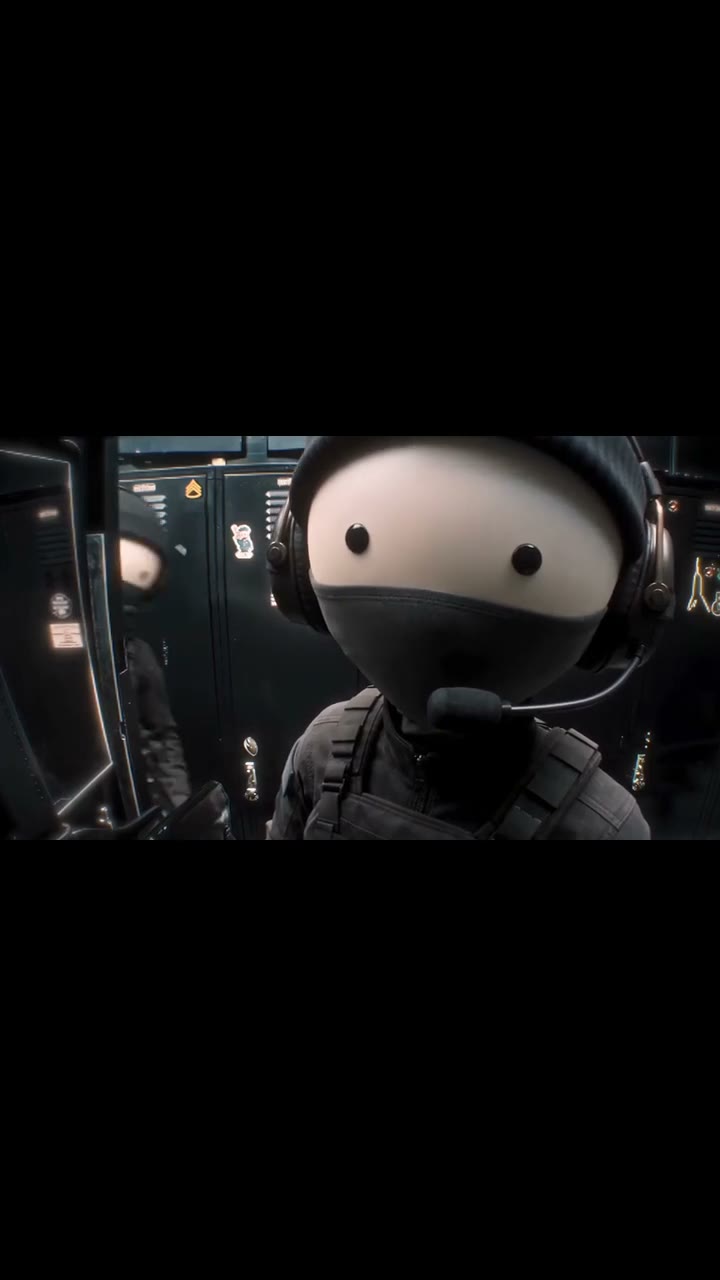
Reference AI fan-edit format inspired by End of Watch (2012); ViralVideoAI generates a new 9:16 scene from your own photo.
What is the End of Watch Locker trend?
The End of Watch locker scene AI meme is a tight handheld fan-edit: a subject stands in a dim locker-room backdrop in a dark uniform and presents a short sequence of inert visual props — radio, flashlight, closed cuffs, a holstered prop kept visibly inert — to a close, slightly shaky camera. Recognition comes from the dim lighting, the handheld framing and the sequential reveal cadence, not from any firearm demonstration.
Step by step
How to make the End of Watch Locker video on ViralVideoAI
Upload your photo, generate a new clip and review the result before sharing.
Prepare the source photo
Use one sharp front-facing adult portrait with clear eyes, no sunglasses and no face covering. Everyday clothing is fine — the uniform and the locker-room backdrop are generated around your face.
Generate your video
Confirm the 130-credit price and start a new vertical render. A close handheld-looking camera stays near the face as the subject shows a radio, flashlight, closed cuffs and a holstered prop — kept visibly inert — one at a time, with a steady breath between each reveal. The dim locker-room backdrop and the dark uniform anchor the recognition.
Review before posting
Check the likeness, motion and final frame. The subject lowers the final prop, meets the lens and gives a small, deadpan salute to close the clip.
Which photo works best?
Source-photo checklist:
- Use one sharp front-facing adult portrait with clear eyes, no sunglasses and no face covering. Everyday clothing is fine — the uniform and the locker-room backdrop are generated around your face.
- Use photos you own or have explicit permission to use. Never upload a child or a non-consenting adult.
- Review faces, hands and fine details at phone size before sharing. AI results differ from the reference clip.
Where did the End of Watch Locker trend start?
The format references the opening-stretch gear-check scene in End of Watch (2012, dir. David Ayer), in which Officer Taylor (Jake Gyllenhaal) and Officer Zavala (Michael Peña) show their LAPD duty gear to a handheld camera in a dim locker room — close framing, each item presented to the lens, a quiet handoff between the two officers. Through 2026, AI fan-edits lifted that composition and placed new faces into the same handheld locker-room shot. This page documents the recurring template; ViralVideoAI generates your own likeness in a fictional setting, not a reproduction of the original cast, the film footage, or its soundtrack.
End of Watch opens in US theaters; the handheld locker-room gear-check scene becomes one of the film's signature moments.
AI fan-edits restaging the locker-scene composition with new faces circulate on TikTok and short-video platforms.
ViralVideoAI publishes a one-photo 10-second vertical adaptation for 130 credits.
One-tap version
Which End of Watch Locker version do you get?
The one-tap flow writes and runs the prompt for you, so there is nothing to copy or edit. You get the version below.
End of Watch Locker
10 s · 9:16 · one photo
10 s · 9:16 · 130 credits
How many credits does it cost?
The one-tap generator currently runs the End of Watch Locker version for 130 credits. The Generate button confirms the price before you spend anything. A failed render returns its credits. See pricing.
What happens in the End of Watch Locker video, second by second?
The reference reads as three visual beats:
| Beat | What happens |
|---|---|
| Setup | Stand in a dim locker room and present a short sequence of harmless gear props to a close, handheld camera. |
| Movement | A close handheld-looking camera stays near the face as the subject shows a radio, flashlight, closed cuffs and a holstered prop — kept visibly inert — one at a time, with a steady breath between each reveal. The dim locker-room backdrop and the dark uniform anchor the recognition. |
| Finish | The subject lowers the final prop, meets the lens and gives a small, deadpan salute to close the clip. |
How to make a stronger End of Watch Locker edit
A recognizable opening frame, a clean subject and a deliberate payoff make the format understandable even with sound off.
- Use one sharp front-facing adult portrait with clear eyes, no sunglasses and no face covering. Everyday clothing is fine — the uniform and the locker-room backdrop are generated around your face.
- Check the first frame at phone size: the subject and setting should be obvious.
- Keep captions clear of the face and the bottom interface area.
Caption, sound and hashtags
Caption idea: "My take on End of Watch Locker." Add any song through your platform's licensed music library and disclose AI-generated visuals where the platform requires it.
Unofficial fan-style interpretation. Not affiliated with Open Road Films, StudioCanal, Exclusive Media, or any End of Watch cast or crew. Clearly inert visual props only; nothing is drawn, aimed or discharged. The clip is not instruction or training content for weapons, policing or any emergency response. Add any licensed music through your posting platform.
FAQ
End of Watch Locker trend questions
What is the End of Watch Locker trend?
Stand in a dim locker room and present a short sequence of harmless gear props to a close, handheld camera. A close handheld-looking camera stays near the face as the subject shows a radio, flashlight, closed cuffs and a holstered prop — kept visibly inert — one at a time, with a steady breath between each reveal. The dim locker-room backdrop and the dark uniform anchor the recognition.
Can I generate this effect on ViralVideoAI?
Yes. Upload one photo and generate a new video for 130 credits. AI results vary from the reference clip, and failed renders refund their credits automatically.
What photo works best?
Use one sharp front-facing adult portrait with clear eyes, no sunglasses and no face covering. Everyday clothing is fine — the uniform and the locker-room backdrop are generated around your face.
Does Jake Gyllenhaal or Michael Peña appear in my video?
No. The subject in the generated clip is built from your uploaded adult portrait only. No End of Watch cast likeness is reproduced, and no original film footage is used.
Is the equipment real?
No. The radio, flashlight, cuffs and holstered prop are fictional, visibly inert AI props. Nothing is drawn or aimed at any person, and the clip is not training or instruction for weapons or police equipment.
Can I upload a photo of a serving officer?
Only with the person's explicit permission. A clear adult portrait is enough — the uniform and locker-room backdrop are generated around the face, so you do not need to source a photo already in uniform.
Why does the camera look handheld?
The slight shake and tight framing are deliberate: they are what makes the composition read as the End of Watch locker scene rather than a generic uniform shot. A locked-off wide tripod framing would miss the format entirely.
Can I post my own version?
Yes, subject to the rights in your photos, video and soundtrack, and the rules of your posting platform. See the disclaimer for the specific rights involved in this trend.
Make your own End of Watch Locker video
Add one photo and tap once. No prompt to write. 130 credits.
3–8 minNo watermarkRefund if render failsSecure checkout by Stripe