ANIMALS
Monkey Eating Apple AI Video: The Macaque Snack Scene
Meet a curious macaque on a sunny forest path and offer it an apple.
- 130 credits
- 10 s video
- 1 photo
The result
A real ViralVideoAI render. Yours stars you.
More trends
More Animals scenes to star in
Cat Human
Parrot Dance
Dog Dance Crew
Bonito Bonito Baby
I'm So In Love With You
iPhone Kupi Dance

AI Elf Dance
Bing Bing Bing Kicking
Choosin' Texas Emo

Mandem in Disguise
- 01Upload your photoClear face, good light.
- 02We render in 3–8 minNo prompt to write.
- 03Download or share9:16 vertical, no watermark.
Monkey Eating Apple is an AI video trend that appeared on TikTok on 1 November 2026 through a CapCut AI template: a person meets a curious macaque on a sunny forest path, holds out a red apple at chest height, and the monkey gently takes it before biting. On ViralVideoAI, upload one waist-up adult photo to generate a 10-second 9:16 fictional version for 130 credits. The monkey is synthetic; no real animal was filmed, approached or fed to make the clip. Failed renders refund automatically.
Also called Monkey eating apple AI · macaque apple trend · monkey takes apple video · AI monkey snack · CapCut monkey apple template · mono con manzana IA · macaco com maçã IA · 猴子吃苹果 AI
Example
What the Monkey Eating Apple video looks like
Study the framing and timing of the Monkey Eating Apple reference before making your own edit.
Result, 10 s, with sound
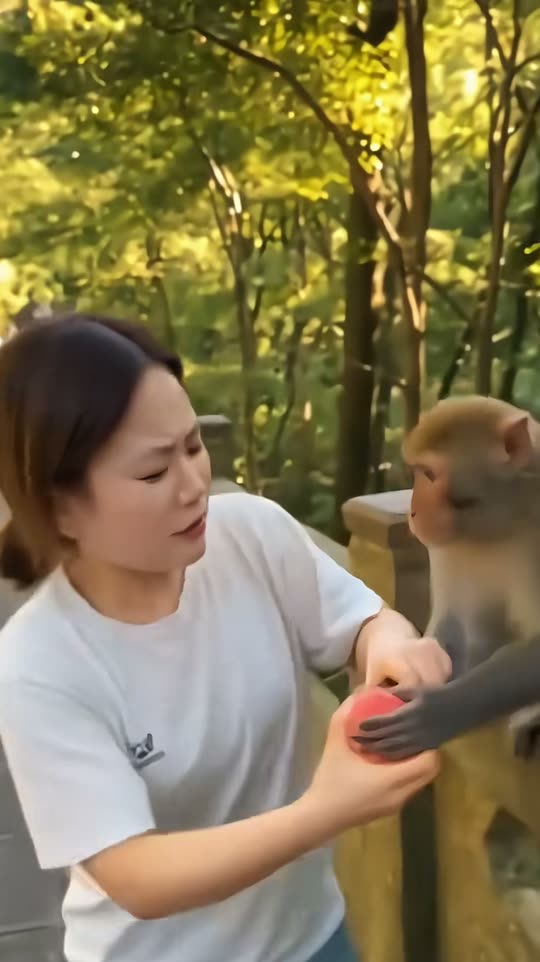
Reference format described by MakeViral based on the 1 November 2026 CapCut AI template. The ViralVideoAI output is a separate 9:16 scene generated from your own photo.
What is the Monkey Eating Apple trend?
The monkey eating apple AI format is a fictional two-character encounter: an uploaded adult portrait meets a generated macaque on a wooded path, offers a red apple at chest height, and watches the animal take and eat it. The hook is the comic timing of the handoff and the macaque's facial reaction — a scenario the model composes without any real animal footage.
Step by step
How to make the Monkey Eating Apple video on ViralVideoAI
Upload your photo, generate a new clip and review the result before sharing.
Prepare the source photo
Use one clear waist-up adult portrait with the hands visible and even lighting. The forest path, the red apple and the macaque are entirely generated — your photo only provides the person.
Generate your video
Confirm the 130-credit price and start a new vertical render. The subject holds a red apple at chest height; the macaque approaches, sniffs it and gently takes it. The forest path, the apple and the animal are all generated — no real monkey is filmed or approached.
Review before posting
Check the likeness, motion and final frame. The monkey takes a bite as the subject reacts with a surprised smile.
Which photo works best?
Source-photo checklist:
- Use one clear waist-up adult portrait with the hands visible and even lighting. The forest path, the red apple and the macaque are entirely generated — your photo only provides the person.
- Use photos you own or have explicit permission to use. Never upload a child or a non-consenting adult.
- Review faces, hands and fine details at phone size before sharing. AI results differ from the reference clip.
Where did the Monkey Eating Apple trend start?
MakeViral reports that the Monkey Eating Apple AI scene appeared on TikTok on 1 November 2026 through a CapCut AI template that stabilised the three visual anchors — a sunny forest path, a red apple at chest height, and a macaque approaching from the right. The format rode a broader wave of animal-encounter AI videos that spread through late 2026 and is often mis-tagged alongside unrelated real monkey-feeding footage. This page documents the visible template, not the first creator.
The apple-and-macaque AI scene first circulates on TikTok via a CapCut AI template.
ViralVideoAI publishes its own one-photo 10-second video version for 130 credits.
One-tap version
Which Monkey Eating Apple version do you get?
The one-tap flow writes and runs the prompt for you, so there is nothing to copy or edit. You get the version below.
Monkey Eating Apple
10 s · 9:16 · one photo
10 s · 9:16 · 130 credits
How many credits does it cost?
The one-tap generator currently runs the Monkey Eating Apple version for 130 credits. The Generate button confirms the price before you spend anything. A failed render returns its credits. See pricing.
What happens in the Monkey Eating Apple video, second by second?
The reference reads as three visual beats:
| Beat | What happens |
|---|---|
| Setup | Meet a curious macaque on a sunny forest path and offer it an apple. |
| Movement | The subject holds a red apple at chest height; the macaque approaches, sniffs it and gently takes it. The forest path, the apple and the animal are all generated — no real monkey is filmed or approached. |
| Finish | The monkey takes a bite as the subject reacts with a surprised smile. |
How to make a stronger Monkey Eating Apple edit
A recognizable opening frame, a clean subject and a deliberate payoff make the format understandable even with sound off.
- Use one clear waist-up adult portrait with the hands visible and even lighting. The forest path, the red apple and the macaque are entirely generated — your photo only provides the person.
- Check the first frame at phone size: the subject and setting should be obvious.
- Keep captions clear of the face and the bottom interface area.
Caption, sound and hashtags
Caption idea: "My take on Monkey Eating Apple." Add any song through your platform's licensed music library and disclose AI-generated visuals where the platform requires it.
This is a fully generated AI scene. Never approach, feed or try to recreate the setup with a real macaque or any wild monkey — macaques carry zoonotic diseases, and feeding or touching them is illegal in most jurisdictions.
FAQ
Monkey Eating Apple trend questions
What is the Monkey Eating Apple trend?
Meet a curious macaque on a sunny forest path and offer it an apple. The subject holds a red apple at chest height; the macaque approaches, sniffs it and gently takes it. The forest path, the apple and the animal are all generated — no real monkey is filmed or approached.
Can I generate this effect on ViralVideoAI?
Yes. Upload one photo and generate a new video for 130 credits. AI results vary from the reference clip, and failed renders refund their credits automatically.
What photo works best?
Use one clear waist-up adult portrait with the hands visible and even lighting. The forest path, the red apple and the macaque are entirely generated — your photo only provides the person.
Is the monkey real?
No. The macaque, the forest path and the apple handoff are all AI-generated. Do not feed or approach wild monkeys to copy the scene — macaques are protected in many jurisdictions and carry zoonotic diseases.
Do I need to hold an apple in my photo?
No. A clear waist-up portrait with visible hands is enough. The red apple and the whole fictional encounter are composed by the model around your subject.
Which TikTok trend does this match?
MakeViral traces the format to a CapCut AI template that first surfaced on 1 November 2026. Related searches include "monkey takes apple AI" and the Chinese-language tag 猴子吃苹果 AI.
Can I use a photo of a child?
The template is tuned for an adult portrait. For child-centered animal scenes, use one of our family-friendly templates after confirming parental or guardian consent for the photo you upload.
Can I post my own version?
Yes, subject to the rights in your photos, video and soundtrack, and the rules of your posting platform. See the disclaimer for the specific rights involved in this trend.
Make your own Monkey Eating Apple video
Add one photo and tap once. No prompt to write. 130 credits.
3–8 minNo watermarkRefund if render failsSecure checkout by Stripe