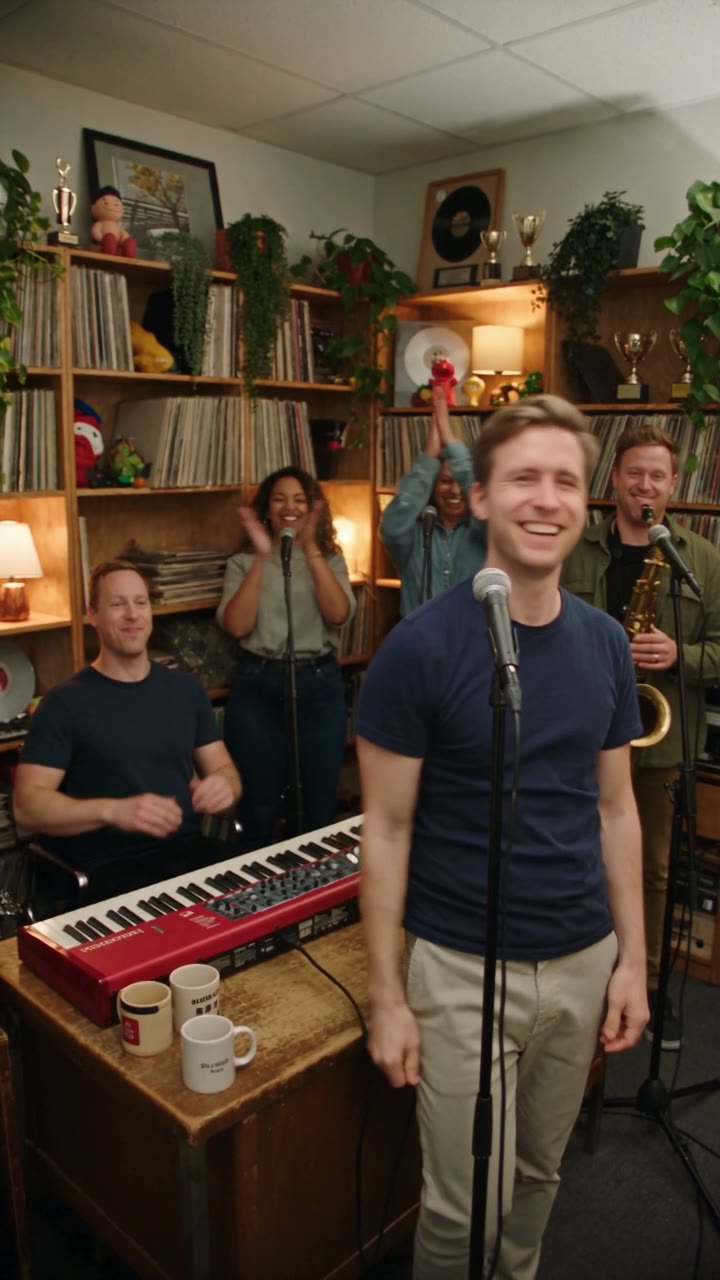
Reference frame — shared by all three variants

Outstanding Tiny Desk AI concert format

2026-10-26 · Ready-to-use templates · 3 variants

Outstanding Tiny Desk AI Templates: 3 Ready-to-Use Variants

Three pre-built Outstanding Tiny Desk AI templates — You, Duo and Band — each with the shot order, the sax solo moment and the photo requirements fixed. You pick the variant and tap once; no prompt to write.

The Outstanding Tiny Desk AI template is a scene configuration for the Tiny Desk AI generator that parodies Charlie Wilson's 2023 Tiny Desk performance of "Outstanding". All three variants run on Seedance 2.0 at 10 seconds, 720p, 9:16, with an original funk-soul groove (not the licensed recording). 126 credits per render; failed videos refund automatically.

Also known as: outstanding tiny desk ai template · outstanding tiny desk set · tiny desk AI template · AI tiny desk concert template · tiny desk AI prompt

  • 1–3 photos you add
  • 10 s clip with sound
  • 9:16 for TikTok, Reels, Shorts
  • No watermark

No prompt to write: pick a variant below and tap once.

Ready in a few minutes · 126 credits per render

At a glance

What is an Outstanding Tiny Desk AI template?

It is a ready-to-use scene for the Tiny Desk AI generator on ViralVideoAI. Each template fixes four things so you don't have to decide: the camera framing (packed bookshelves behind an office desk), the shot order (lead → close-up → sax solo → fists), the sax solo moment (at six seconds), and the song structure (an original funk-soul groove in the shape of "Outstanding"). You choose how many people are in it — one, two or three — and add the photos. The template handles the rest.

New to the trend? Read the Tiny Desk AI trend timeline for every dated moment — Charlie Wilson's 2023 Tiny Desk, the 18 October 2026 viral parody, and the one-photo generators that followed — with sources.

The three templates

Pick a variant: You, Duo or Band

Same format, same credits, different number of people in the clip. Each card shows the shot order, the photos you need, and the one-tap Try button.

Variant #1 · 1 photo

You — the solo lead

One photo of you as the lead singer; the AI builds the band around you.

126 credits

Who's in it

  • Lead singer: you (18+)

Photo checklist

  • Chest-up, face toward the camera, both eyes visible
  • Good even light; no sunglasses, no heavy filter
  • One adult (18+). No celebrity, coach or athlete lookalikes.

Beat by beat

TimeWhat happens
0–3 sYou sing lead, eyes closed, AI band in frame.
3–6 sClose-up on your face — high note, then a laugh.
6–8.5 sAI bandmate takes the sax solo at the right.
8.5–10 sFist in the air, bandmates respond behind.

Pick this when

You want the spotlight on one person — self-roast, karaoke dare, a solo tribute to your group chat. No one to tag.

Avoid when

Your friends want to be in the clip. Use Duo or Band so no one is left out.

Variant #2 · 2 photos

Duo — lead + sax player

Two photos. You sing lead; a friend on sax takes the mid-clip solo.

126 credits

Who's in it

  • Photo 1: lead singer (you)
  • Photo 2: sax player (a friend)

Photo checklist

  • Both photos chest-up and matched for framing
  • Similar lighting on both faces if possible
  • Only friends who agreed to be in a public clip (18+)

Beat by beat

TimeWhat happens
0–3 sYou sing lead; friend sways with the sax beside you.
3–6 sYour close-up — high note, then a laugh.
6–8.5 sFriend's sax solo — camera cuts to them.
8.5–10 sBoth fists in the air.

Pick this when

You have one friend who said yes and you want their name in the mentions. The duet moment at 6 seconds is the share hook.

Avoid when

You want three people in the clip, or your friend prefers to be the lead — swap the photo order in that case.

Variant #3 · 3 photos

Band — lead + sax + keys

Three photos. Full trio: lead singer, sax player, and keys behind.

126 credits

Who's in it

  • Photo 1: lead singer (you)
  • Photo 2: sax player
  • Photo 3: keys / piano

Photo checklist

  • Three chest-up photos; each face clearly visible
  • All three adults (18+), all said yes
  • Logos on clothes come out plain — fine for the format

Beat by beat

TimeWhat happens
0–3 sYou lead; friend 2 on sax at right; friend 3 on keys behind.
3–6 sYour close-up, then a cut to the keys.
6–8.5 sFriend 2's sax solo.
8.5–10 sAll three fists in the air.

Pick this when

Group-chat reunion, workplace team, roommates. The All-Loss format is a Band clip — three fists at the end carry the share moment.

Avoid when

A photo isn't chest-up, or a lighting mismatch is severe. Use Duo instead and switch the third face into a stitch reply.

Side-by-side comparison

Same model, same length, same price. The only axis is how many people are in the clip.

TemplatePhotosBest forCredits
You1Solo tribute, self-roast, karaoke dare126
Duo2Tagged duet post with one friend126
Band3Group chat, workplace team, roommates126

Still unsure? A one-screen decision guide.

  1. 1. Are you going to tag a friend in the post?

    No → use You. Yes, one friend → use Duo. Two or more → use Band.

  2. 2. Do you have clean chest-up photos of everyone?

    If one of them doesn't meet the photo checklist, drop down a tier (Band → Duo, Duo → You) rather than ship a render that will fail on that face. A failed render refunds automatically, but a drop-down avoids the wait.

  3. 3. Does the hook land on the solo or on the ending fists?

    Solo (6 s) → Duo — the sax friend's cameo is the whole point. Fists (9 s) → Band — three fists in the air carry the share moment.

Template questions

What is an Outstanding Tiny Desk AI template?

A ready-to-use scene configuration for the Tiny Desk AI generator on ViralVideoAI. Each template fixes the camera, the shot order, the sax solo moment, and the song structure, so you only choose how many people are in the clip. The format parodies Charlie Wilson's 2023 Tiny Desk performance of "Outstanding"; the audio in the exported MP4 is an original funk-soul groove, not the licensed recording.

How many Tiny Desk AI templates are there?

Three: You (1 photo, solo lead), Duo (2 photos, lead + sax player) and Band (3 photos, lead + sax + keys). All three run on Seedance 2.0 at 10 seconds, 720p, 9:16, and all three cost 126 credits per render.

Which template should I pick?

Pick the variant that matches the number of people in your clip. Solo tribute or self-roast → You. One friend who said yes → Duo. Group chat, workplace team or roommates → Band. The Band variant is the one that produced the viral "All-Loss Tiny Desk Concert"; the Duo variant is the strongest for a tagged duet post.

Can I see the prompt text behind each template?

No. ViralVideoAI keeps the prompts server-side so the output stays consistent across renders. What you see on this page — scene, beat timing, photo requirements — is everything the one-tap generator needs from you.

How long does one render take?

A few minutes. The create page shows live progress; the finished 10-second 9:16 MP4 appears for download and is also saved to My Videos. If the render fails, the 126 credits are returned automatically.

Does the clip use the real "Outstanding" recording?

No. Each template exports with an original funk-soul groove — ViralVideoAI never embeds the licensed audio. On TikTok you can add the Outstanding sound from the TikTok sound library over the clip; TikTok handles the licensing.

Can I put a celebrity in it?

No. The generator refuses celebrity, athlete and coach likenesses across every template. Only your own photos and photos of friends who said yes (18+).

Related AI video templates

All AI video templates

Pick a variant and ship a Tiny Desk AI clip today

1–3 photos, one tap, 10-second 9:16 MP4 ready for TikTok. 126 credits per render; failed videos refund automatically.

No watermark. A failed video refunds its credits. ViralVideoAI is not affiliated with NPR, the Tiny Desk concert series, or Charlie Wilson.