PRANK
Shaving Cream AI Video Generator: Foam Reveal
The first subject wipes a dab of cream from the chin; a quick camera whip reveals the second subject covered in foam. Upload 2 photos and get a 7-second 9:16 render in a few minutes.
- 130 credits
- 7 s video
- 2 photos
- 9:16
- No watermark
✨ The result
A real Shaving Cream Trend render. Yours stars you.
Shaving Cream Trend is a short-form AI video format set in a playful two-shot foam reveal. The first subject wipes a dab of cream from the chin; a quick camera whip reveals the second subject covered in foam. Upload 2 photos, pay 130 credits per render, and receive a 7-second vertical 9:16 video. Credits are refunded automatically if the render fails.
Example
What the Shaving Cream Trend video looks like
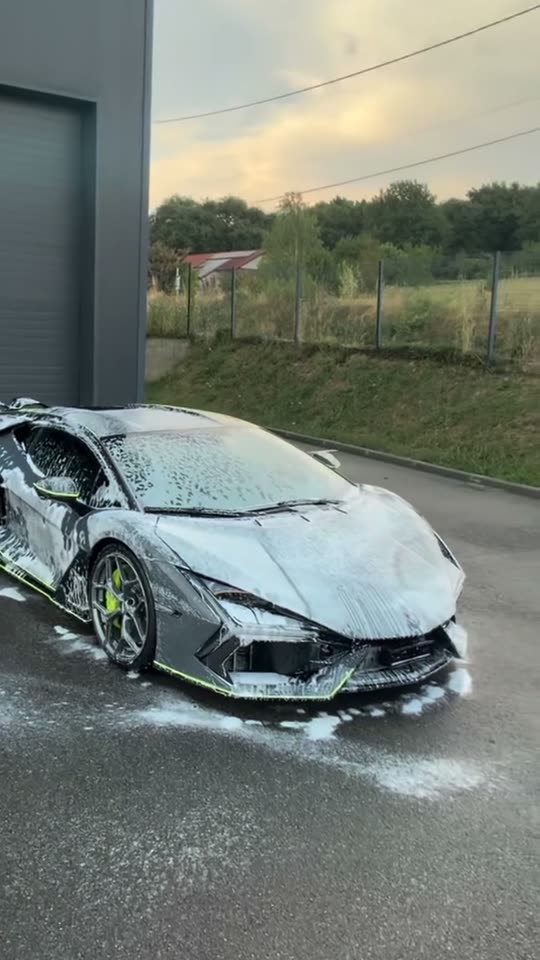
Watch the reference to see the framing, timing and main moves. The generator uses the same scene and sequence with your uploaded photos.
Input
Result, 7 s, with sound
Shaving Cream Trend reference: a playful two-shot foam reveal.
Use this referenceWhat is the Shaving Cream Trend trend?
A small dab of foam creates the setup. The first subject wipes the chin with a blank expression, then the camera swings to a much bigger, foam-covered reveal. The contrast between a tiny smear and an absurd amount of foam carries the joke.
Step by step
How to make the Shaving Cream Trend video on ViralVideoAI
Three steps from photo to post. The render runs on your account and the credits only deduct once the clip starts processing.
Upload your photo
Add 2 photos. Use one clear portrait for the opening subject and one clear photo of the person, pet or car in the reveal.
Follow the visual sequence
The first subject wipes a dab of cream from the chin; a quick camera whip reveals the second subject covered in foam.
Prepare to post
The reference uses the reference reel audio. Use audio you have the right to post with.
Which photo works best?
Use one clear portrait for the opening subject and one clear photo of the person, pet or car in the reveal.
- Use one clear portrait for the opening subject and one clear photo of the person, pet or car in the reveal.
- Keep the two subjects in separate photos and make the reveal subject easy to recognize.
- Use photos you own or have permission to use.
Where did the Shaving Cream Trend trend start?
This page follows the Shaving Cream Trend visual format. It describes the recognizable scene and action without claiming that the example is your generated result.
Copy and paste
The Shaving Cream Trend prompt
The one-tap flow currently uses the version below. [Image 1] is your photo. Copy the prompt only if you want to run it by hand.
Foam reveal
7s · 9:16 · 2 photos
7s · 9:16 · 2 photos · 130 credits
How many credits does it cost?
The one-tap generator currently runs the Foam reveal version for 130 credits. The Generate button confirms the price before you spend anything. A failed render returns its credits. See pricing.
What happens in the Shaving Cream Trend video, second by second?
The reference follows these recognizable visual beats.
| Moment | What to watch for |
|---|---|
| Setup | A close-up shows a small patch of cream on the first subject’s chin. |
| Transition | A quick hand wipe and camera whip hide the cut. |
| Reveal | The second subject appears heavily covered in foam. |
Caption, sound and hashtags
Add any licensed trend sound in the social app when posting if your exported video does not include it.
FAQ
Shaving Cream Trend trend questions
What is the Shaving Cream Trend?
It is a video format set in a playful two-shot foam reveal. The first subject wipes a dab of cream from the chin; a quick camera whip reveals the second subject covered in foam.
How many photos do I need for Shaving Cream Trend?
You need 2 photos. Use one clear portrait for the opening subject and one clear photo of the person, pet or car in the reveal.
Can I generate Shaving Cream Trend here now?
Yes. Upload your photo above, confirm the credits, and the 7-second render finishes in a few minutes. Credits are refunded automatically if it fails.
What can appear in the foam reveal?
The visual format can use a partner, pet or car as the second subject. This page currently presents the car reference clip.
More trends
Other AI video templates
AI Couple Prank
A two-person cliff plank prank with a sudden step and comic drop. Watch the reference and learn the shot order.
Cat Human
Your cat or dog gets a human body at a sunny party, grabs cake off a tray, laughs and licks the plate. One pet photo, 10 seconds.
I'm So In Love With You
Arms wide with clenched fists, then fists on the hips, singing along with a straight face — the October 2026 meme from one photo.
Shaking Head
Your cat or dog looks into the camera, shuts its eyes in a smug grin and slowly shakes its head, then stares wide-eyed with the tongue tip out.
Golden Ball Prank
You sit in the gala crowd, walk on stage, shake the host's hand and lift a golden football trophy. One photo, 12 seconds, with sound.
Street Light Slide
Slide from the far end of a night path into a close-up beneath a glowing street light.
Make your own Shaving Cream Trend video
Add one photo and tap once. No prompt to write. 130 credits.
No watermark. A failed video gives its credits back. Secure checkout by Stripe.