NEW YEAR
Hello 2027 AI Video: Stand on Giant 2027 Numbers
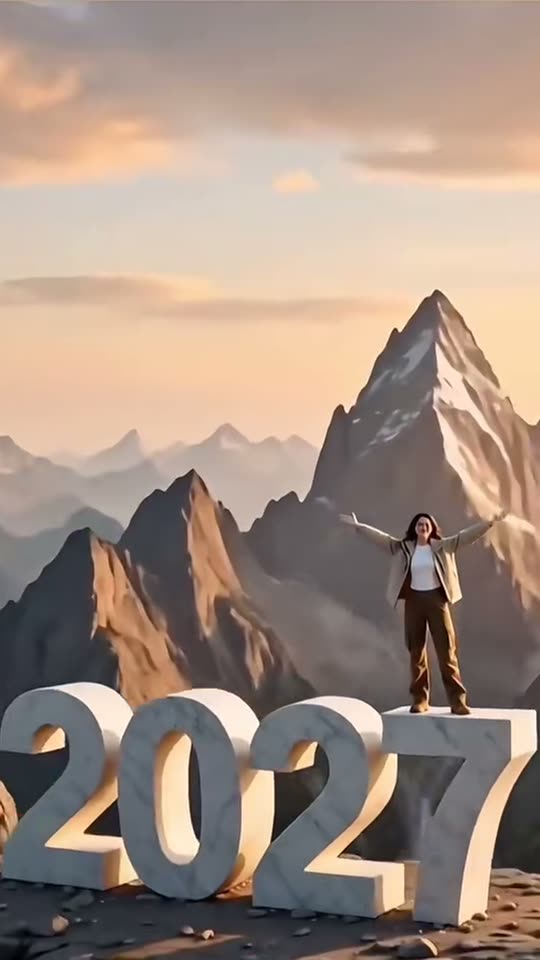
Climb onto giant white “2027” numbers above a sunset sea of clouds, open your arms, and let the camera pull back for the New Year reveal. Upload one portrait and get an 8-second vertical render.
- 130 credits
- 8 s video
- 1 photo
The result
A real ViralVideoAI render. Yours stars you.
- 01Upload your photoClear face, good light.
- 02We render in 3–8 minNo prompt to write.
- 03Download or share9:16 vertical, no watermark.
Hello 2027 is a New Year AI video trend in which a person climbs giant marble year numbers on a mountain ridge, opens their arms on top, and the camera pulls back to reveal all four digits. On ViralVideoAI you upload one portrait and get an 8-second 9:16 version starring you for 130 credits, refunded automatically if the render fails. New Year videos peak from late December to the first week of January.
Example
What the Hello 2027 video looks like
Watch the reference clip for the camera position, pacing and payoff. Your render follows the same idea with your face in a 8-second version; the clip itself was not made from your photo.
Input
Result, 8 s, with sound
Reference video and image: MakeViral, original reel attributed there to @c0pe6zs0b9.
What is the Hello 2027 trend?
The numbers are the story, so they must read “2027” in the final wide shot. The climb gives the reveal its motion; the pullback supplies the scale and the New Year payoff.
Step by step
How to make the Hello 2027 video on ViralVideoAI
Three steps from photo to post. Credits deduct only once the render starts, and a failed render refunds automatically.
Upload your photo
Use a sharp waist-up portrait with a clear face and unobstructed hair, one person per image. This version places a person on the numbers; pets are not supported yet.
Create the video
Confirm 130 credits. The 8-second render follows these beats: 0–2.5 s: You pull yourself up onto the giant marble numerals. 2.5–4.5 s: You stand on top, turn to the camera and open your arms. 4.5–8 s: The camera pulls back until “2027” and the mountain skyline fill the frame.
Post it
Download the 9:16 file, check face and details at the start, middle and end, then add any caption or licensed sound in the social app.
Which photo works best?
Use a sharp waist-up portrait with a clear face and unobstructed hair, one person per image. This version places a person on the numbers; pets are not supported yet.
- Use a sharp waist-up portrait with a clear face and unobstructed hair, one person per image. This version places a person on the numbers; pets are not supported yet.
- Use an image you own or have permission to use.
- Check the face and scene at the beginning, middle and end of the clip.
Where did the Hello 2027 trend start?
The reference page attributes the original Hello 2027 reel to @c0pe6zs0b9. This guide focuses on the visual format rather than unverified view counts or claims about who started the wider trend.
One-tap version
Which Hello 2027 version do you get?
The one-tap flow writes and runs the prompt for you, so there is nothing to copy or edit. You get the version below.
New Year reveal
8s · 9:16 · 1 photo
8s · 9:16 · 1 photo · 130 credits
How many credits does it cost?
The one-tap generator currently runs the New Year reveal version for 130 credits. The Generate button confirms the price before you spend anything. A failed render returns its credits. See pricing.
What happens in the Hello 2027 video, second by second?
Your render follows these beats.
| Moment | What happens |
|---|---|
| 0–2.5 s | You pull yourself up onto the giant marble numerals. |
| 2.5–4.5 s | You stand on top, turn to the camera and open your arms. |
| 4.5–8 s | The camera pulls back until “2027” and the mountain skyline fill the frame. |
What makes this version work
The numbers are the story, so they must read “2027” in the final wide shot. The climb gives the reveal its motion; the pullback supplies the scale and the New Year payoff.
- Use a sharp waist-up portrait with a clear face and unobstructed hair, one person per image. This version places a person on the numbers; pets are not supported yet.
- Keep the main action readable on a phone-sized vertical screen.
Caption, sound and hashtags
Caption idea: “Taking the long way into 2027.” Publish the final frame as a thumbnail so the year stays readable in feeds, and post between December 31 and January 2 for the biggest New Year wave.
Reference video and image: MakeViral, original reel attributed there to @c0pe6zs0b9.
FAQ
Hello 2027 trend questions
What is the Hello 2027 video?
Hello 2027 is a New Year AI video trend in which a person climbs giant marble year numbers on a mountain ridge, opens their arms on top, and the camera pulls back to reveal all four digits. On ViralVideoAI you upload one portrait and get an 8-second 9:16 version starring you for 130 credits, refunded automatically if the render fails. New Year videos peak from late December to the first week of January.
Can I make this video on ViralVideoAI now?
Yes. Upload one photo above, confirm 130 credits, and the 8-second 9:16 render is ready in a few minutes. Credits are refunded automatically if it fails.
What photo should I use?
Use a sharp waist-up portrait with a clear face and unobstructed hair, one person per image. This version places a person on the numbers; pets are not supported yet.
What if a digit comes out wrong?
Video models can distort lettering. Check that the final frame reads 2027 before posting, and re-render if a digit is wrong — a failed render refunds automatically, a readable-but-wrong one is a retry.
When should I post my Hello 2027 video?
Render it a few days early and post between December 31, 2026 and January 2, 2027, when New Year videos get the most reach. Rendering early leaves time for a retry.
How long is the Hello 2027 video?
8 seconds, vertical 9:16: about 4.5 seconds of climbing and the open-arm pose, then a 3.5-second camera pullback that reveals all four 2027 numerals.
Can I make the Hello 2027 video with my pet?
Not in this version. The generator places a person on the numbers, so upload a clear photo of one person.
More trends
Other AI video templates
Skyfall AI
A tiny figure in a rose sunset sky, the camera follows you down, then a close-up of your calm face. You or your pet.
Birthday Car
A candlelit cake, a drifting car, the driver’s birthday wish and a monochrome freeze.
Street Light Slide
Slide from the far end of a night path into a close-up beneath a glowing street light.
Skull Cap Trend
Goofy before, hand-over-lens cut, dark hood and skull cap. Glow-up sequence explained.
Bonito Bonito Baby
One photo of your baby becomes a 15-second clip: a proud smile, a pretend sip, a hug and a sway, framed in the room from the photo.
I'm So In Love With You
Arms wide with clenched fists, then fists on the hips, singing along with a straight face — the October 2026 meme from one photo.
Make your own Hello 2027 video
Add one photo and tap once. No prompt to write. 130 credits.
3–8 minNo watermarkRefund if render failsSecure checkout by Stripe