CARTOON
Chiikawa Nokia Dance AI: Your Photo, a Tiny Chibi, a Ringing Phone
One photo becomes a tiny chibi you or your pet, swaying beside a ringing old phone. 10 seconds, 9:16, 130 credits.
- 130 credits
- 10 s video
- 1 photo
See the effect
Chiikawa Nokia dance effect preview. Your generation: 10 seconds, vertical 9:16, with newly generated phone beeps.
More trends
More Cartoon scenes to star in
AI Caricature
DJ Cat
Dog Drummer
Cat on Ultra Bee
Come and Get It
Let's Break Up
Bonito Bonito Baby
I'm So In Love With You
iPhone Kupi Dance
Cat Human
- 01Upload your photoClear face, good light.
- 02We render in 3–8 minNo prompt to write.
- 03Download or share9:16 vertical, no watermark.
Chiikawa Nokia Dance AI turns one portrait or pet photo into a 10-second vertical cartoon: a tiny personalized chibi sways beside a ringing candybar phone, turns around, wiggles and looks back. ViralVideoAI builds the character and motion from your upload for 130 credits. Hair, glasses, outfit colors or pet markings guide the design. The scene uses a white background and newly generated old-phone beeps. No dance recording, costume or animation software is needed.
About $5.55 per render on our best-value plan. See plans
Also called Usagi Nokia dance · Nokia ringtone dance AI · Chiikawa phone dance · chibi ringtone dance · Hachiware dance meme · ちいかわ nokia · nokia tune dance AI · one photo chibi dance generator · ringtone chibi animation
Example
What the Chiikawa Nokia Dance video looks like
Your tiny cartoon self sways, turns and wiggles beside a buzzing old phone. The dancer looks back over its shoulder while the phone keeps ringing.
Effect example
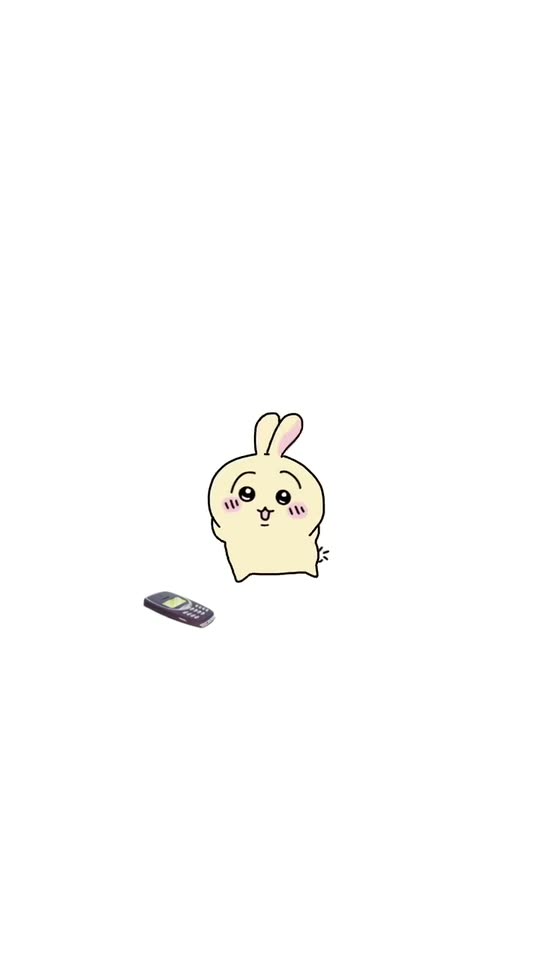
Chiikawa Nokia dance effect preview. Your generation: 10 seconds, vertical 9:16, with newly generated phone beeps.
What is the Chiikawa Nokia Dance trend?
Chiikawa dancing Nokia is a ringtone-dance format: a tiny rounded cartoon sways beside an old phone, turns away and wiggles instead of answering. The AI version turns a portrait or pet photo into a personalized chibi dancer.
Step by step
How to make the Chiikawa Nokia Dance video on ViralVideoAI
No prompt to write. Choose one clear photo, check the price and create your version.
Add your photo
Upload one clear adult portrait or one whole-body pet photo. Show the hairstyle or ears and coat markings; keep other subjects out.
Create your video
Confirm 130 credits to generate a 10-second 9:16 clip. Stay on the page to watch progress, or return to My videos.
Download and share
Check the result, download it and add a licensed track in your posting app if you want a specific song.
Which photo works best?
For the clearest Chiikawa Nokia Dance result:
- One adult portrait or one pet photo. Show hair, glasses or fur markings clearly.
- JPG, PNG or WebP, up to 10 MB. Use a sharp, evenly lit image with one subject.
- For a person, include the whole head and the outfit colors you want. A chest-up portrait works well.
- For a pet, show its ears, muzzle, paws and distinctive coat patches. Avoid a crop that hides half the animal.
- Use your own photo or a portrait of an adult who agreed to participate.
Where did the Chiikawa Nokia Dance trend start?
The format is recognizable by its simple visual joke: a tiny doodle treats a ringing phone as dance music. Searches often call it the Usagi Nokia dance or Chiikawa phone dance. This generator adapts that setup into a personalized cartoon from your photo, keeping the white page, small character, phone and repeated front-to-back movement. The names help identify the format; they do not indicate an official Chiikawa or Nokia product.
Nagano's Chiikawa characters begin serializing on X (formerly Twitter) in Japan, establishing the round-pastel chibi style that later lends its name to the dance format.
A Japanese creator posts a loopable doodle animation of a tiny chibi swaying beside a ringing Nokia-style candybar phone; the clip spreads under #ちいかわ and #chiikawadance.
TikTok search for 'chiikawa dancing nokia', 'usagi nokia dance' and 'nokia ringtone dance' climbs as English-speaking creators restage the format on a plain white page.
ViralVideoAI publishes the one-tap Chiikawa Nokia Dance generator: one adult or pet photo produces a 10-second 9:16 chibi dance with newly generated monophonic phone beeps, not the Nokia Tune or the viral recording.
One-tap version
Which Chiikawa Nokia Dance version do you get?
The one-tap flow writes and runs the prompt for you, so there is nothing to copy or edit. You get the version below.
Chiikawa Nokia Dance
10 s · 9:16 · one clear photo
10 s · 9:16 · 130 credits
How many credits does it cost?
The one-tap generator currently runs the Chiikawa Nokia Dance version for 130 credits. The Generate button confirms the price before you spend anything. A failed render returns its credits. See pricing.
What happens in the Chiikawa Nokia Dance video, second by second?
The scene has a clear setup, action and finish.
| Time | Character movement | Phone and camera |
|---|---|---|
| 0–2.5 s | Front-facing sway, tiny hops and blushing smile | Phone vibrates; camera stays fixed |
| 2.5–5 s | Turn around and wiggle left and right | Phone remains at the lower left |
| 5–7.5 s | Turn forward and repeat the bouncy sway | Whole character stays in frame |
| 7.5–10 s | Turn back, wiggle and glance over the shoulder | No answer, no cut, no zoom |
What carries over from your photo?
| Your upload | Kept in the cartoon | Changed for the effect |
|---|---|---|
| Adult portrait | Hair color and shape, glasses, facial hair, skin tone and outfit colors | Face and body simplify into a rounded flat doodle |
| Pet photo | Species cues, ear shape, muzzle and distinctive fur patches | Body becomes a small rounded chibi with paws |
| Background | Not used as the scene | A clean white page replaces the setting |
| Phone | No phone needed in the upload | One unbranded candybar phone is generated |
Which photo should you choose: a selfie or a pet picture?
Use a selfie when hair, glasses or a distinctive outfit make you recognizable. A chest-up picture gives the generator enough clothing color without making the face tiny. For a pet, use a whole-body photo rather than a close crop of the nose: ears, patches and tail shape do more of the recognition work in a simple cartoon. You only need one subject and one upload; there is no separate mode to select.
How to keep the tiny dancer recognizable
| If you notice | Likely cause | What to try |
|---|---|---|
| The cartoon feels generic | Hair or markings are obscured | Choose a brighter image with a visible head outline or distinctive fur patches |
| A person grows animal ears | The simplified design drifts | Use an unobstructed human portrait; check the first front-facing shot |
| The pet changes breed or colors | Coat details are too small in the photo | Use a closer whole-body photo in daylight |
| The back grows a second face | The model loses the front/back relationship | Review both turns; regenerate if the back view is wrong |
| The phone gets picked up or duplicates | Object motion drifts | Check that exactly one phone stays on the floor for the whole clip |
| The ringtone differs from the viral sound | Audio is newly generated | Keep the generated beeps or add an available licensed platform sound |
Ringtone, sound and posting ideas
The sound direction is a simple original monophonic phone-beep pattern with a soft vibration buzz. Speech, singing and a backing song are not requested. The Nokia name identifies the old-phone dance format; the output phone is unbranded, and the exact Nokia Tune or a viral recording is not promised. If a platform offers the trend sound in its licensed library, you can add it after downloading.
- Caption: “When I should answer but the ringtone is too good.”
- Caption: “Do not disturb. Tiny me is in rehearsal.”
- Caption: “The ringtone slaps harder than the call.”
- Caption: “POV: you turned into a chibi at exactly the wrong moment.”
- Core hashtags: #ChiikawaDance #NokiaDance #ChibiDance #AIVideo
- Long-tail hashtags: #RingtoneDance #ChibiMe #NokiaMeme #TinyDancer #ちいかわ #AIanimation
- Keep the AI label where your posting platform requires it.
Photo-to-cartoon generator or a manual edit?
| Task | This AI template | Manual animation or edit |
|---|---|---|
| Starting material | One portrait or pet photo | A drawn character, filmed clip or animation assets |
| Character design | A chibi guided by your upload | You draw, rig or choose the character |
| Motion | The sway, turns and wiggle are built in | You animate or edit each movement |
| Control | A preset 10-second scene with variable fine details | Frame-level timing if you animate it yourself |
| Best fit | A quick personalized take on the ringtone dance | A precisely choreographed or named-character animation |
Caption, sound and hashtags
Add your caption after downloading. For a named song, use a licensed track available in your posting app.
- Caption idea: “Sorry, my tiny self is busy dancing to your call.”
- Review the result and label AI media where your posting platform requires it.
FAQ
Chiikawa Nokia Dance trend questions
What is the Chiikawa dancing Nokia trend?
Chiikawa dancing Nokia is a ringtone-dance format: a tiny rounded cartoon sways beside an old phone, turns away and wiggles instead of answering. The AI version turns a portrait or pet photo into a personalized chibi dancer.
How do I make the Nokia dance from one photo?
Upload one adult portrait or a whole-body pet photo on this page, check the 130-credit price and press Generate. The template creates the rounded cartoon, ringing-phone scene and 10-second dance. No prompt or recorded dance is required.
Can I use a cat or dog instead of a person?
Yes. The same upload slot accepts a person or a pet. A clear pet photo guides the ears, muzzle and coat markings, while the body becomes a tiny rounded cartoon with paws.
Will the dancer look like an exact Chiikawa character?
Your upload becomes a personalized rounded chibi. A person keeps simplified hair, glasses and outfit colors; a pet keeps its species cues and coat markings. The generator does not reproduce Chiikawa, Hachiware or Usagi — it borrows only the flat pastel-doodle style and creates an original character from your photo.
Will my real face be pasted onto the cartoon?
The design simplifies the photo into a flat doodle. Recognition comes mainly from hair, glasses, skin tone, clothing colors or pet markings; it is not a realistic face pasted onto a cartoon body.
What should I upload?
Use JPG, PNG or WebP, up to 10 MB, with one subject in good light. For a person, show the whole head and outfit colors. For a pet, show its body, ears and coat pattern. Do not upload a group photo.
What does the tiny character do?
It sways facing forward, turns around for a side-to-side wiggle, turns forward again, then finishes with a glance over the shoulder. The old phone keeps buzzing on the floor and is never answered.
Does it include the exact Nokia ringtone?
The generator requests new monophonic phone beeps and a soft vibration buzz. The exact Nokia Tune and the viral recording are not included as licensed audio assets. You can add a sound available in your posting platform’s licensed library.
How long is the output and how much does it cost?
One 10-second vertical 9:16 video costs 130 credits. The button confirms the charge before you generate. Processing can take a few minutes, depending on the queue; failed renders return their credits automatically.
Can I make the dance without CapCut?
Yes. The photo-to-video flow runs in your browser. You do not need an editing app, a phone prop, a costume or an animation timeline. Download the result when processing finishes.
Why is the character so small on a white background?
The empty white page and small full-body character are part of the visual composition. The extra space keeps the phone, hops and front-to-back turns visible instead of cropping the dancer.
Can I get a transparent-background animation?
This template generates a video on a white background. It does not export a transparent sticker or a separate character cutout.
What should I check before posting?
Watch both turns, check that the face appears only on the front, confirm the colors and markings stay stable, and make sure there is one character and one phone. The ringtone and fine movement can vary between generations.
Can I sell merch or run ads with the output?
The output is an original cartoon generated from your upload, not a Chiikawa or Nokia asset. You can post it on TikTok, Reels and Shorts with an AI label where your platform requires one. For paid advertising or physical merchandise, confirm your own likeness consent and your platform's AI-content rules first.
Make your own Chiikawa Nokia Dance video
Add one photo and tap once. No prompt to write. 130 credits.
3–8 minNo watermarkRefund if render failsSecure checkout by Stripe