SEASONAL
Thanksgiving PFP AI: Your Cozy Pumpkin-Pie Portrait
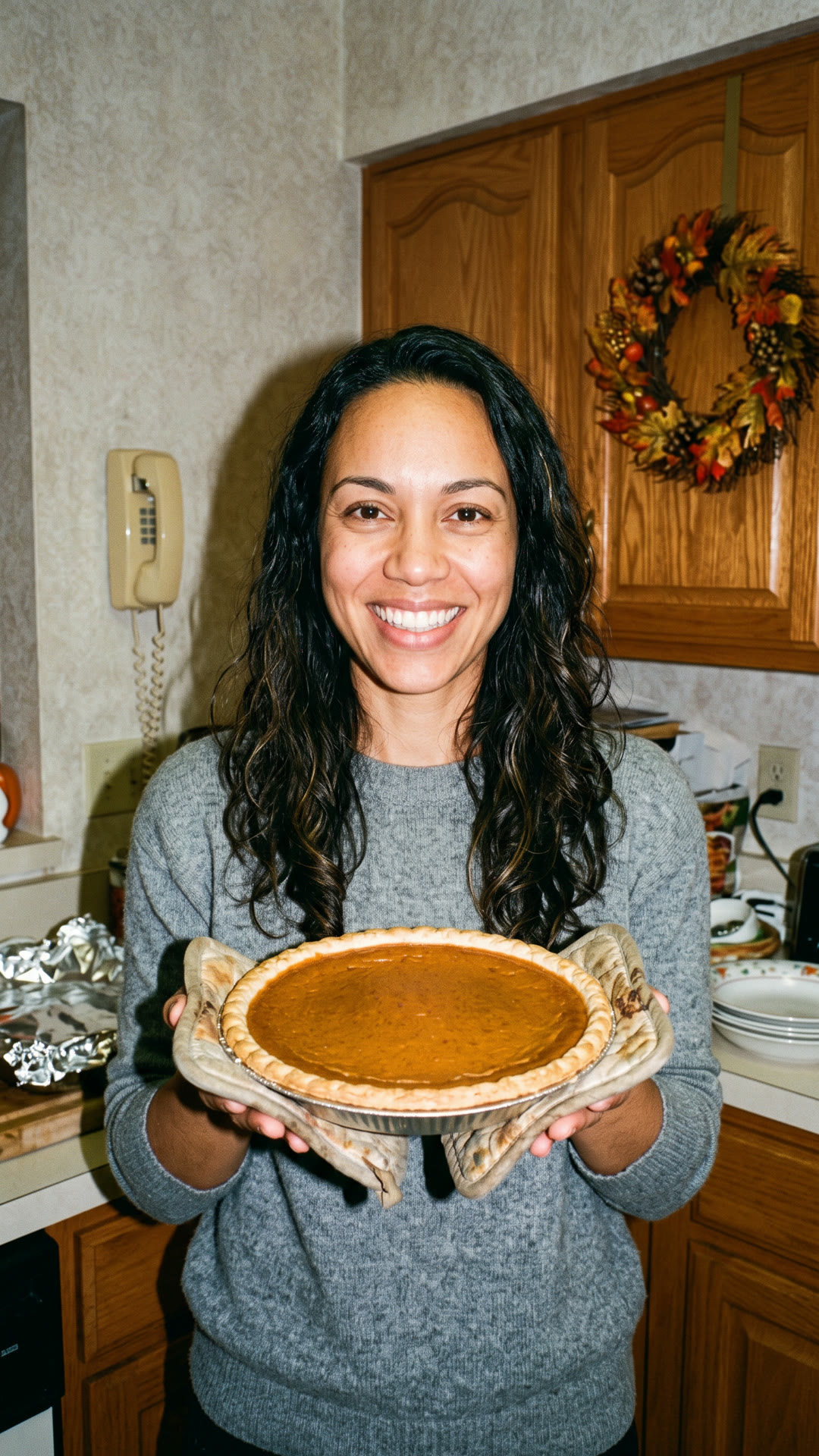
The subject poses with the pie as the camera gently moves closer and warm kitchen lights glow. Add one clear photo and make your 10-second video.
- 130 credits
- 10 s video
- 1 photo
See the effect
Thanksgiving PFP: the scene, the motion and the payoff.
More trends
More Seasonal scenes to star in
Flower Bouquet of Me
AI Christmas Photoshoot
Diwali Fireworks Transition
Bonito Bonito Baby
I'm So In Love With You
iPhone Kupi Dance
Cat Human
AI Elf Dance
Bing Bing Bing Kicking

Choosin' Texas Emo
- 01Upload your photoClear face, good light.
- 02We render in 3–8 minNo prompt to write.
- 03Download or share9:16 vertical, no watermark.
Thanksgiving PFP AI is a seasonal moving profile portrait set in a cozy autumn kitchen with pumpkin pie, warm flash lighting and a stable centered final frame for a square or circular avatar crop. ViralVideoAI turns one adult or pet selfie into a 10-second 9:16 video — recognizable face, autumn colors, pie prop — through November 27, 2026. Pause the clip on the held final frame and save a screenshot for a still avatar. One render costs 130 credits; failed renders refund automatically.
About $5.55 per render on our best-value plan. See plans
Also called Fall profile picture · Turkey Day PFP · Friendsgiving avatar · pumpkin pie avatar · Thanksgiving 头像 · サンクスギビング アイコン · avatar de Acción de Gracias · Thanksgiving profile pic
Example
What the Thanksgiving PFP video looks like
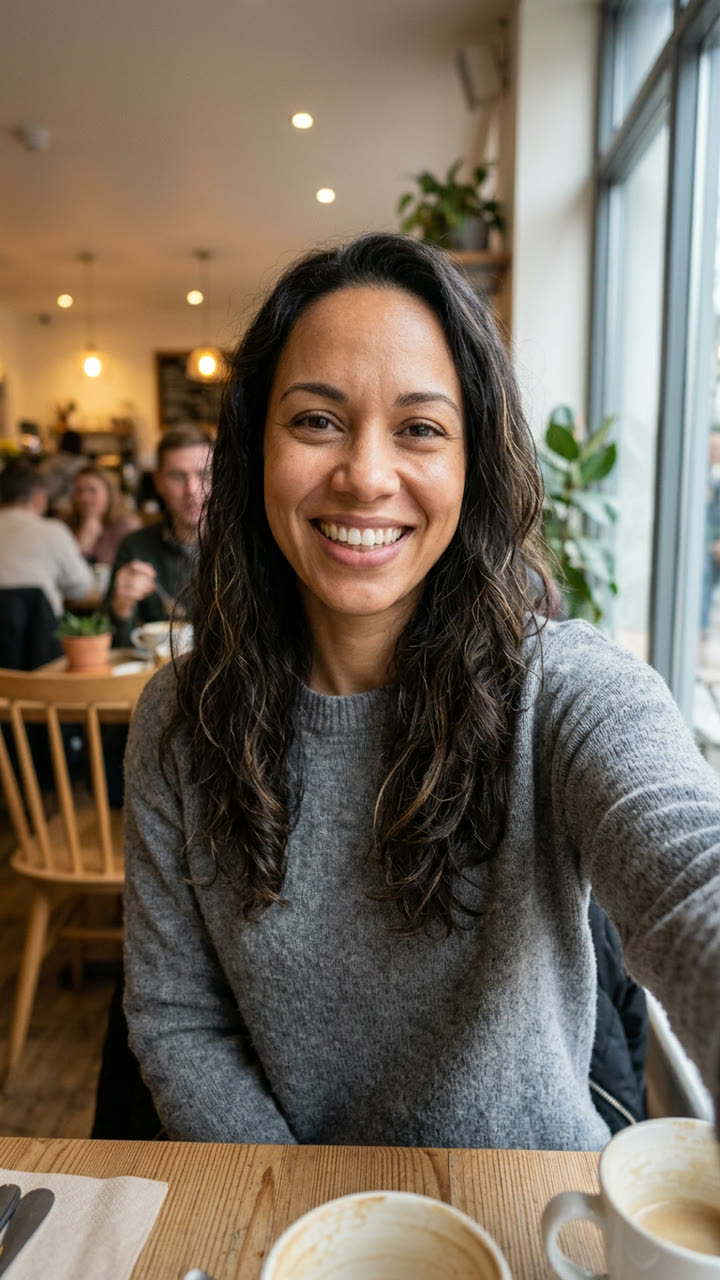
See the composition and framing. Your version is a moving portrait with a steady final frame.
Input
Effect example
Thanksgiving PFP: the scene, the motion and the payoff.
What is the Thanksgiving PFP trend?
A Thanksgiving PFP is a seasonal profile portrait using autumn colors, a holiday meal or pumpkin-pie props. This version creates a short moving portrait with a centered final frame for a profile-picture crop.
Step by step
How to make the Thanksgiving PFP video on ViralVideoAI
No prompt to write. Choose one clear photo, check the price and create your version.
Add your photo
Use one adult or pet portrait facing the camera, with eyes open, ears or hair visible and space above the head.
Create your video
Confirm 130 credits to generate a 10-second 9:16 clip. Stay on the page to watch progress, or return to My videos.
Save your video or a frame
Download the clip, pause on the held final frame and save a screenshot for a gift or profile picture.
Which photo works best?
For the clearest Thanksgiving PFP result:
- Use one adult or pet portrait facing the camera, with eyes open, ears or hair visible and space above the head.
- Use sharp, evenly lit images without heavy face filters or sunglasses.
- Use your own photos or photos of adults who agreed to participate.
Where did the Thanksgiving PFP trend start?
Thanksgiving profile pictures have been a seasonal social-media ritual since the early 2010s, cycling turkey, pumpkin pie and Friendsgiving table motifs each November. For 2026, AI photo apps shipped turkey and pie PFP filters as still images; ViralVideoAI’s moving portrait interpretation renders a 10-second 9:16 video whose last frame doubles as a classic Thanksgiving avatar. The seasonal window peaks on Thanksgiving Day, November 26, 2026.
AI photo apps roll out still Thanksgiving PFP filters with pie and turkey props.
ViralVideoAI publishes a moving-portrait Thanksgiving PFP template with a held final frame for still-avatar cropping.
Thanksgiving Day — the seasonal window peaks.
Black Friday — the seasonal boost on this template ends after today.
One-tap version
Which Thanksgiving PFP version do you get?
The one-tap flow writes and runs the prompt for you, so there is nothing to copy or edit. You get the version below.
Thanksgiving PFP
10 s · 9:16 · one clear photo
10 s · 9:16 · 130 credits
How many credits does it cost?
The one-tap generator currently runs the Thanksgiving PFP version for 130 credits. The Generate button confirms the price before you spend anything. A failed render returns its credits. See pricing.
What happens in the Thanksgiving PFP video, second by second?
The scene has a clear setup, action and finish.
| Beat | What happens |
|---|---|
| Setup | a cozy retro kitchen with an autumn wreath, warm flash lighting and a pumpkin pie |
| Action | The subject poses with the pie as the camera gently moves closer and warm kitchen lights glow. |
| Finish | The camera holds a centered face-and-shoulders composition with room for a square or circular crop. |
What your photo controls in Thanksgiving PFP
| Element | What to expect |
|---|---|
| Identity | The face or pet markings from your photo |
| Scene | a cozy retro kitchen with an autumn wreath, warm flash lighting and a pumpkin pie |
| Output | 10 seconds, vertical 9:16 |
| Audio | Newly generated audio; no source recording |
| Best input | Use one adult or pet portrait facing the camera, with eyes open, ears or hair visible and space above the head. |
Thanksgiving PFP: timing and motion
0–3: kitchen portrait; 3–8: gentle push-in; 8–10: centered hold for cropping.
Get a cleaner result
| If you notice | Try this |
|---|---|
| The profile circle cuts off the head | Keep your face centered with room above the hair or ears. Crop from the held ending rather than a moving frame. |
| Face softens during movement | Use a higher-quality front-facing portrait with even lighting |
| The result differs from the example | AI varies timing and details. Review the clip before sharing |
Caption, sound and hashtags
Use the video as a moving greeting, or crop a screenshot from the held final frame for your profile.
- Caption idea: “My Thanksgiving PFP version.”
- Review the result and label AI media where your posting platform requires it.
The export is a 10-second 9:16 video. For a still Thanksgiving avatar, pause on the centered final frame and save a screenshot — the composition already leaves room for a square or circular crop. This flow does not produce a dedicated 2K image export.
FAQ
Thanksgiving PFP trend questions
What is a Thanksgiving PFP AI video?
A seasonal moving profile portrait set in a cozy autumn kitchen with a pumpkin pie and warm lighting. ViralVideoAI’s version is a 10-second 9:16 vertical video with a held centered final frame — a short holiday greeting that doubles as a still avatar when you pause on the last frame.
Do I get a photo or a video?
A 10-second vertical video (9:16 MP4). The last two seconds hold on a centered portrait, so you can pause and save a screenshot as a still avatar. No dedicated still-image export is produced by this flow.
Which photo works best for a Thanksgiving PFP?
One sharp front-facing selfie or pet portrait with the face centered, eyes open and space above the hair or ears. Avoid sunglasses, heavy filters and group shots — the composition is built around one recognizable subject.
Can I use a pet photo?
Yes. A clear front-facing pet portrait with the whole head and coat markings visible keeps the pet recognizable, and the autumn scene scales around the body. Dogs, cats and rabbits all work; keep the head centered with space above it.
Will the result keep my face?
Yes. The template keeps facial features, skin tone and hair recognizable while a festive kitchen scene is rendered around you. Clothing, lighting and background are newly generated for the Thanksgiving setting; review the preview before sharing.
Is this too late for Thanksgiving?
Thanksgiving falls on November 26, 2026, and the seasonal window on this template lasts through November 27. The kitchen and pumpkin pie motifs also work for Friendsgiving, autumn lookbooks and Black Friday posts.
How much does it cost?
One 10-second render costs 130 credits. The Generate button confirms the price before you spend anything, and failed renders refund their credits automatically.
Make your own Thanksgiving PFP video
Add one photo and tap once. No prompt to write. 130 credits.
3–8 minNo watermarkRefund if render failsSecure checkout by Stripe