HALLOWEEN
Halloween Ceiling Fan AI Trend: 4 Costumes, 1 Fan
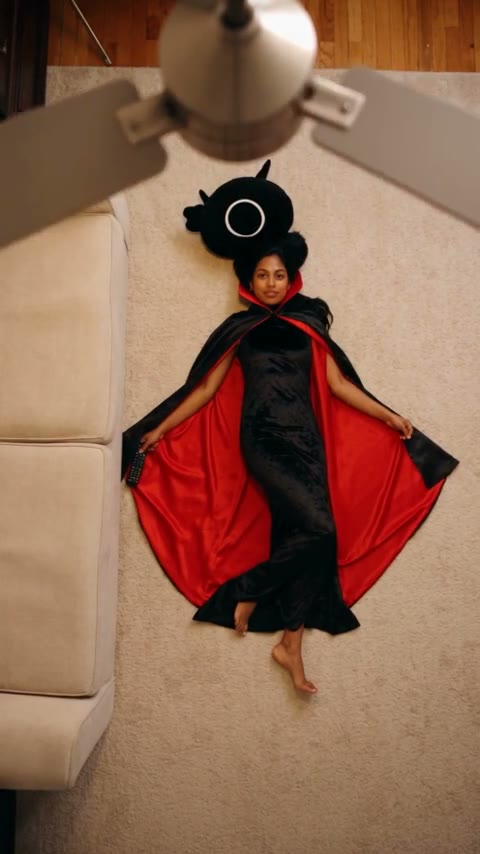
A slow fan blade sweeps across the camera, and each pass reveals you in another Halloween costume: witch, vampire, skeleton, devil. Upload one photo and get a 12-second overhead render with your face in every look.
- 130 credits
- 12 s video
- 1 photo
The result
A real ViralVideoAI render. Yours stars you.
- 01Upload your photoClear face, good light.
- 02We render in 3–8 minNo prompt to write.
- 03Download or share9:16 vertical, no watermark.
The Halloween Ceiling Fan trend is a costume-transition video filmed from above, where each pass of a rotating ceiling-fan blade hides a switch to a new Halloween look. On ViralVideoAI one portrait becomes a 12-second 9:16 video that cycles through witch, vampire, skeleton and devil costumes while your face stays the same, for 130 credits with an automatic refund if the render fails.
Example
What the Halloween Ceiling Fan video looks like
Watch the reference clip for the camera position, pacing and payoff. Your render follows the same idea with your face in a 12-second version; the clip itself was not made from your photo.
Input
Result, 12 s, with sound
AI-made reference video and image: MakeViral Halloween Ceiling Fan example.
What is the Halloween Ceiling Fan trend?
The fan is the edit point. The blades briefly hide the subject, so each reveal can surprise without a jarring jump in camera angle. A fixed overhead camera and a steady pose make the effect easy to read.
Step by step
How to make the Halloween Ceiling Fan video on ViralVideoAI
Three steps from photo to post. Credits deduct only once the render starts, and a failed render refunds automatically.
Upload your photo
Use one well-lit solo photo with your face clearly visible. Avoid hats, sunglasses or accessories that hide the eyes; all four costumes are added for you.
Create the video
Confirm 130 credits. The 12-second render follows these beats: 0–2 s: Overhead view: you in your own clothes under the turning fan. 2–9.5 s: Blade passes reveal the witch, vampire and skeleton looks in turn. 9.5–12 s: The final devil look holds long enough to read face and costume.
Post it
Download the 9:16 file, check face and details at the start, middle and end, then add any caption or licensed sound in the social app.
Which photo works best?
Use one well-lit solo photo with your face clearly visible. Avoid hats, sunglasses or accessories that hide the eyes; all four costumes are added for you.
- Use one well-lit solo photo with your face clearly visible. Avoid hats, sunglasses or accessories that hide the eyes; all four costumes are added for you.
- Use an image you own or have permission to use.
- Check the face and scene at the beginning, middle and end of the clip.
Where did the Halloween Ceiling Fan trend start?
This is a Halloween variation of the ceiling-fan outfit-change format. The reference video supplied by MakeViral uses AI-made people, so it is presented as an example rather than a real costume shoot.
One-tap version
Which Halloween Ceiling Fan version do you get?
The one-tap flow writes and runs the prompt for you, so there is nothing to copy or edit. You get the version below.
Four-costume fan wipe
12s · 9:16 · 1 photo
12s · 9:16 · 1 photo · 130 credits
How many credits does it cost?
The one-tap generator currently runs the Four-costume fan wipe version for 130 credits. The Generate button confirms the price before you spend anything. A failed render returns its credits. See pricing.
What happens in the Halloween Ceiling Fan video, second by second?
Your render follows these beats.
| Moment | What happens |
|---|---|
| 0–2 s | Overhead view: you in your own clothes under the turning fan. |
| 2–9.5 s | Blade passes reveal the witch, vampire and skeleton looks in turn. |
| 9.5–12 s | The final devil look holds long enough to read face and costume. |
What makes this version work
The fan is the edit point. The blades briefly hide the subject, so each reveal can surprise without a jarring jump in camera angle. A fixed overhead camera and a steady pose make the effect easy to read.
- Use one well-lit solo photo with your face clearly visible. Avoid hats, sunglasses or accessories that hide the eyes; all four costumes are added for you.
- Keep the main action readable on a phone-sized vertical screen.
Caption, sound and hashtags
Caption idea: “One fan, four Halloween plans.” A quick outfit count in the caption gives viewers a reason to replay.
AI-made reference video and image: MakeViral Halloween Ceiling Fan example.
FAQ
Halloween Ceiling Fan trend questions
What is the Halloween Ceiling Fan video?
The Halloween Ceiling Fan trend is a costume-transition video filmed from above, where each pass of a rotating ceiling-fan blade hides a switch to a new Halloween look. On ViralVideoAI one portrait becomes a 12-second 9:16 video that cycles through witch, vampire, skeleton and devil costumes while your face stays the same, for 130 credits with an automatic refund if the render fails.
Can I make this video on ViralVideoAI now?
Yes. Upload one photo above, confirm 130 credits, and the 12-second 9:16 render is ready in a few minutes. Credits are refunded automatically if it fails.
What photo should I use?
Use one well-lit solo photo with your face clearly visible. Avoid hats, sunglasses or accessories that hide the eyes; all four costumes are added for you.
Do I need four real costumes?
No. You upload one everyday photo; the render dresses you in all four Halloween looks and hides each switch behind a fan blade.
Which costumes appear in the Halloween Ceiling Fan video?
Four, in this order: witch, vampire, skeleton and devil. Your own outfit from the photo opens the clip, and the devil look holds at the end.
Can I choose different costumes?
Not yet. The one-tap version runs one fixed witch, vampire, skeleton and devil sequence.
Do I need a ceiling fan at home?
No. The fan, the room and the overhead camera angle are all generated; you only upload one photo.
More trends
Other AI video templates
Halloween Makeup Filter
Your close portrait flips from everyday makeup to a cracked porcelain doll look in one concealed hair-flip cut.
Witch on the Metro
Stick a phone to the train window, race the metro on a broom and bonk into the platform wall — with your face.
Angel or Devil Filter
A meter races over your head: angel wings on one side, a red devil on the other. Then a halo drops, or cartoon horns grow.
Street Light Slide
Slide from the far end of a night path into a close-up beneath a glowing street light.
Bonito Bonito Baby
One photo of your baby becomes a 15-second clip: a proud smile, a pretend sip, a hug and a sway, framed in the room from the photo.
I'm So In Love With You
Arms wide with clenched fists, then fists on the hips, singing along with a straight face — the October 2026 meme from one photo.
Make your own Halloween Ceiling Fan video
Add one photo and tap once. No prompt to write. 130 credits.
3–8 minNo watermarkRefund if render failsSecure checkout by Stripe