HALLOWEEN
Halloween Makeup Filter AI: Hair-Flip SFX Reveal
Start with your everyday face, flip your hair forward, and come back up in full Halloween SFX makeup — a cracked porcelain doll that stays locked to your face instead of a glitching AR filter. Upload one portrait for a 10-second render.
- 130 credits
- 10 s video
- 1 photo
The result
A real ViralVideoAI render. Yours stars you.
- 01Upload your photoClear face, good light.
- 02We render in 3–8 minNo prompt to write.
- 03Download or share9:16 vertical, no watermark.
The Halloween Makeup Filter trend is a close-up transformation where one hair flip hides the cut between an everyday face and theatrical Halloween makeup. Unlike an AR filter, ViralVideoAI bakes the look into the video, so it never slips when you move: upload one portrait and get a 10-second 9:16 reveal in cracked-porcelain-doll makeup for 130 credits, refunded automatically if the render fails.
Example
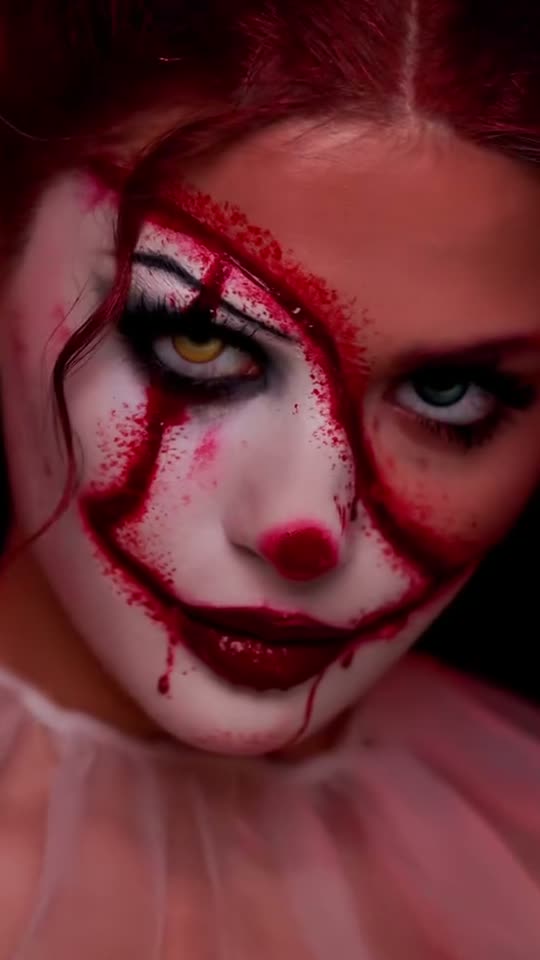
What the Halloween Makeup Filter video looks like
Watch the reference clip for the camera position, pacing and payoff. Your render follows the same idea with your face in a 10-second version; the clip itself was not made from your photo.
Input
Result, 10 s, with sound
Original makeup reel preview: MakeViral, attributed there to @anastasia_shnabel.
What is the Halloween Makeup Filter trend?
The effect depends on the same face, framing and light before and after the flip. A plain black background makes the changed makeup more striking and keeps attention on the eyes.
Step by step
How to make the Halloween Makeup Filter video on ViralVideoAI
Three steps from photo to post. Credits deduct only once the render starts, and a failed render refunds automatically.
Upload your photo
Use a sharp chest-up portrait with both eyes open. Avoid sunglasses, beauty filters and heavy shadow so your face reads the same before and after the reveal.
Create the video
Confirm 130 credits. The 10-second render follows these beats: 0–3.5 s: Close-up of your everyday face with steady eye contact. 3.5–5 s: A hair flip covers the face and hides the cut. 5–10 s: You rise in cracked porcelain doll makeup and hold an eerie stare.
Post it
Download the 9:16 file, check face and details at the start, middle and end, then add any caption or licensed sound in the social app.
Which photo works best?
Use a sharp chest-up portrait with both eyes open. Avoid sunglasses, beauty filters and heavy shadow so your face reads the same before and after the reveal.
- Use a sharp chest-up portrait with both eyes open. Avoid sunglasses, beauty filters and heavy shadow so your face reads the same before and after the reveal.
- Use an image you own or have permission to use.
- Check the face and scene at the beginning, middle and end of the clip.
Where did the Halloween Makeup Filter trend start?
The reference is attributed to SFX makeup artist @anastasia_shnabel. Her original clip used physical makeup and a hair-flip transition; the AI version made here is labeled as AI and is not her work.
One-tap version
Which Halloween Makeup Filter version do you get?
The one-tap flow writes and runs the prompt for you, so there is nothing to copy or edit. You get the version below.
Porcelain doll reveal
10s · 9:16 · 1 photo
10s · 9:16 · 1 photo · 130 credits
How many credits does it cost?
The one-tap generator currently runs the Porcelain doll reveal version for 130 credits. The Generate button confirms the price before you spend anything. A failed render returns its credits. See pricing.
What happens in the Halloween Makeup Filter video, second by second?
Your render follows these beats.
| Moment | What happens |
|---|---|
| 0–3.5 s | Close-up of your everyday face with steady eye contact. |
| 3.5–5 s | A hair flip covers the face and hides the cut. |
| 5–10 s | You rise in cracked porcelain doll makeup and hold an eerie stare. |
What makes this version work
The effect depends on the same face, framing and light before and after the flip. A plain black background makes the changed makeup more striking and keeps attention on the eyes.
- Use a sharp chest-up portrait with both eyes open. Avoid sunglasses, beauty filters and heavy shadow so your face reads the same before and after the reveal.
- Keep the main action readable on a phone-sized vertical screen.
Halloween makeup filter vs AI makeup video
| AR makeup filter | AI makeup video | |
|---|---|---|
| How it works | Live overlay tracked to your face | Look rendered into every frame |
| When you move or flip your hair | Can slip, flicker or drop off | Stays on the face through the flip |
| Transition | You film and edit the cut yourself | Hair-flip reveal built in |
| What you need | The app and good lighting | One portrait photo |
| Cost | Free inside the app | 130 credits per render |
Caption, sound and hashtags
Caption idea: “Same face. Different Halloween.” Choose a cover frame after the reveal so the look is clear before playback.
Original makeup reel preview: MakeViral, attributed there to @anastasia_shnabel.
FAQ
Halloween Makeup Filter trend questions
What is the Halloween Makeup Filter video?
The Halloween Makeup Filter trend is a close-up transformation where one hair flip hides the cut between an everyday face and theatrical Halloween makeup. Unlike an AR filter, ViralVideoAI bakes the look into the video, so it never slips when you move: upload one portrait and get a 10-second 9:16 reveal in cracked-porcelain-doll makeup for 130 credits, refunded automatically if the render fails.
Can I make this video on ViralVideoAI now?
Yes. Upload one photo above, confirm 130 credits, and the 10-second 9:16 render is ready in a few minutes. Credits are refunded automatically if it fails.
What photo should I use?
Use a sharp chest-up portrait with both eyes open. Avoid sunglasses, beauty filters and heavy shadow so your face reads the same before and after the reveal.
Is the original makeup reel AI-generated?
No. The reference features real SFX makeup by its creator. The AI render imitates the transition style with a different look and should not be presented as her original work.
Is there a free Halloween makeup filter?
Yes. TikTok, Instagram and Snapchat offer free AR Halloween makeup effects in their effect galleries. They track your face live but can slip during fast moves like a hair flip. The AI video here costs 130 credits and renders the look into every frame instead.
Which Halloween makeup look does the AI video use?
A cracked porcelain doll: pale ivory base, painted black cracks, big black-lined doll eyes, rosy cheeks and a red heart-shaped lip. It is painted-style makeup with no blood or gore.
Will it still look like me?
The render keeps the face shape, eyes, nose, mouth and skin tone from your photo under the makeup. A sharp, front-facing portrait gives the best likeness, and a failed render refunds its credits.
More trends
Other AI video templates
Halloween Ceiling Fan
Each slow ceiling-fan blade wipe reveals you in a different Halloween costume: witch, vampire, skeleton, devil.
Angel or Devil Filter
A meter races over your head: angel wings on one side, a red devil on the other. Then a halo drops, or cartoon horns grow.
Witch on the Metro
Stick a phone to the train window, race the metro on a broom and bonk into the platform wall — with your face.
Bonito Bonito Baby
One photo of your baby becomes a 15-second clip: a proud smile, a pretend sip, a hug and a sway, framed in the room from the photo.
I'm So In Love With You
Arms wide with clenched fists, then fists on the hips, singing along with a straight face — the October 2026 meme from one photo.
iPhone Kupi Dance
A dark hotel room at night: flip a plain foldable open to the camera, then dance and toss it. One photo, 15 seconds.
Make your own Halloween Makeup Filter video
Add one photo and tap once. No prompt to write. 130 credits.
3–8 minNo watermarkRefund if render failsSecure checkout by Stripe