HALLOWEEN
Witch on the Metro AI Video: Fly a Broom Beside the Train
Stick a phone to the metro window, step off, and race the train on a broomstick until the platform wall ends the flight. Upload one portrait and get your own 15-second Halloween version in a few minutes.
- 130 credits
- 15 s video
- 1 photo
The result
A real ViralVideoAI render. Yours stars you.
- 01Upload your photoClear face, good light.
- 02We render in 3–8 minNo prompt to write.
- 03Download or share9:16 vertical, no watermark.
Witch on the Metro is a Halloween AI video trend filmed from a phone stuck to a train window: a witch flies a broom alongside the moving metro, then bonks into the platform wall. On ViralVideoAI you upload one portrait and get a 15-second 9:16 version with your face as the witch for 130 credits; a failed render refunds automatically. The reference reel shown here runs about 28 seconds.
Example
What the Witch on the Metro video looks like
Watch the reference clip for the camera position, pacing and payoff. Your render follows the same idea with your face in a 15-second version; the clip itself was not made from your photo.
Input
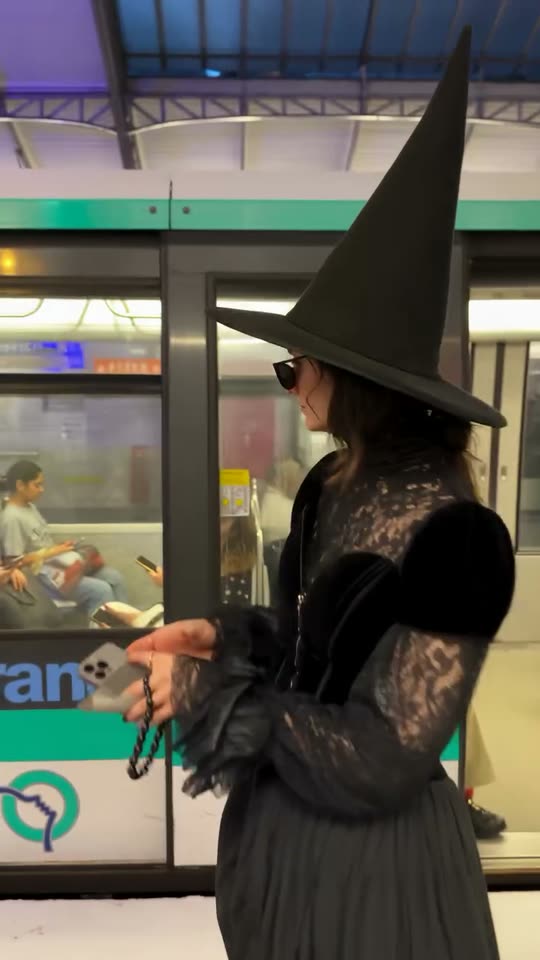
Result, 15 s, with sound
Reference video and image: MakeViral, original reel attributed there to @ifonly.ai.
What is the Witch on the Metro trend?
The train-window point of view makes the flying witch feel like an accidental recording rather than a staged fantasy scene. The station, the window reflection and the matching train speed stay legible before the final gag.
Step by step
How to make the Witch on the Metro video on ViralVideoAI
Three steps from photo to post. Credits deduct only once the render starts, and a failed render refunds automatically.
Upload your photo
Choose a solo, front-facing head-and-shoulders portrait in even light. Keep both eyes visible; the pointed hat and cloak are added for you.
Create the video
Confirm 130 credits. The 15-second render follows these beats: 0–3 s: You press the phone to the window, wink, and step off the train. 4–11 s: The train pulls away and you fly beside it on a broom, waving through the glass. 11–15 s: The platform ends: a cartoon bonk into the wall, a squashed hat and a sheepish thumbs-up.
Post it
Download the 9:16 file, check face and details at the start, middle and end, then add any caption or licensed sound in the social app.
Which photo works best?
Choose a solo, front-facing head-and-shoulders portrait in even light. Keep both eyes visible; the pointed hat and cloak are added for you.
- Choose a solo, front-facing head-and-shoulders portrait in even light. Keep both eyes visible; the pointed hat and cloak are added for you.
- Use an image you own or have permission to use.
- Check the face and scene at the beginning, middle and end of the clip.
Where did the Witch on the Metro trend start?
The Halloween version builds on the “phone on the train” format: a fixed phone films its owner trying to keep pace with a departing train. The reference shown here is attributed to @ifonly.ai; the scene is AI-made.
One-tap version
Which Witch on the Metro version do you get?
The one-tap flow writes and runs the prompt for you, so there is nothing to copy or edit. You get the version below.
Witch on a broom
15s · 9:16 · 1 photo
15s · 9:16 · 1 photo · 130 credits
How many credits does it cost?
The one-tap generator currently runs the Witch on a broom version for 130 credits. The Generate button confirms the price before you spend anything. A failed render returns its credits. See pricing.
What happens in the Witch on the Metro video, second by second?
Your render follows these beats.
| Moment | What happens |
|---|---|
| 0–3 s | You press the phone to the window, wink, and step off the train. |
| 4–11 s | The train pulls away and you fly beside it on a broom, waving through the glass. |
| 11–15 s | The platform ends: a cartoon bonk into the wall, a squashed hat and a sheepish thumbs-up. |
What makes this version work
The train-window point of view makes the flying witch feel like an accidental recording rather than a staged fantasy scene. The station, the window reflection and the matching train speed stay legible before the final gag.
- Choose a solo, front-facing head-and-shoulders portrait in even light. Keep both eyes visible; the pointed hat and cloak are added for you.
- Keep the main action readable on a phone-sized vertical screen.
Caption, sound and hashtags
Caption idea: “Missed the train. Found another way.” Keep the collision clearly fictional and add music only when you have posting rights.
Reference video and image: MakeViral, original reel attributed there to @ifonly.ai.
FAQ
Witch on the Metro trend questions
What is the Witch on the Metro video?
Witch on the Metro is a Halloween AI video trend filmed from a phone stuck to a train window: a witch flies a broom alongside the moving metro, then bonks into the platform wall. On ViralVideoAI you upload one portrait and get a 15-second 9:16 version with your face as the witch for 130 credits; a failed render refunds automatically. The reference reel shown here runs about 28 seconds.
Can I make this video on ViralVideoAI now?
Yes. Upload one photo above, confirm 130 credits, and the 15-second 9:16 render is ready in a few minutes. Credits are refunded automatically if it fails.
What photo should I use?
Choose a solo, front-facing head-and-shoulders portrait in even light. Keep both eyes visible; the pointed hat and cloak are added for you.
Is the metro crash a real stunt?
No. It is a fictional AI video gag with a cartoon-style bonk and no injury. The moving-train setup and impact should never be recreated in real life.
Do I need a photo in a witch costume?
No. Upload an everyday portrait; the pointed hat and cloak are generated. A costume photo can hide your face and weaken the likeness.
How long is the Witch on the Metro video?
15 seconds, vertical 9:16: about 3 seconds of phone setup on the train, 7 seconds of broom flight beside the metro, and a 4-second platform bonk and thumbs-up.
When should I post it?
Between October 29 and October 31, when Halloween searches and the trend peak. The export is a clean 9:16 MP4 with no watermark for TikTok, Instagram Reels and YouTube Shorts; add licensed trend audio in the app.
More trends
Other AI video templates
Halloween Ceiling Fan
Each slow ceiling-fan blade wipe reveals you in a different Halloween costume: witch, vampire, skeleton, devil.
Halloween Makeup Filter
Your close portrait flips from everyday makeup to a cracked porcelain doll look in one concealed hair-flip cut.
Missed Train Dance
Sprint the stairs, the yellow doors close, drop to your knees, then dance it off on the platform.
I'm So In Love With You
Arms wide with clenched fists, then fists on the hips, singing along with a straight face — the October 2026 meme from one photo.
Cat Human
Your cat or dog gets a human body at a sunny party, grabs cake off a tray, laughs and licks the plate. One pet photo, 10 seconds.
Shaking Head
Your cat or dog looks into the camera, shuts its eyes in a smug grin and slowly shakes its head, then stares wide-eyed with the tongue tip out.
Make your own Witch on the Metro video
Add one photo and tap once. No prompt to write. 130 credits.
3–8 minNo watermarkRefund if render failsSecure checkout by Stripe